Prompt Chaining Explained: Patterns, Examples & When to Use It
Prompt chaining breaks a complex task into a sequence of smaller AI steps. Learn how it works, common patterns, real examples, and when to use it.

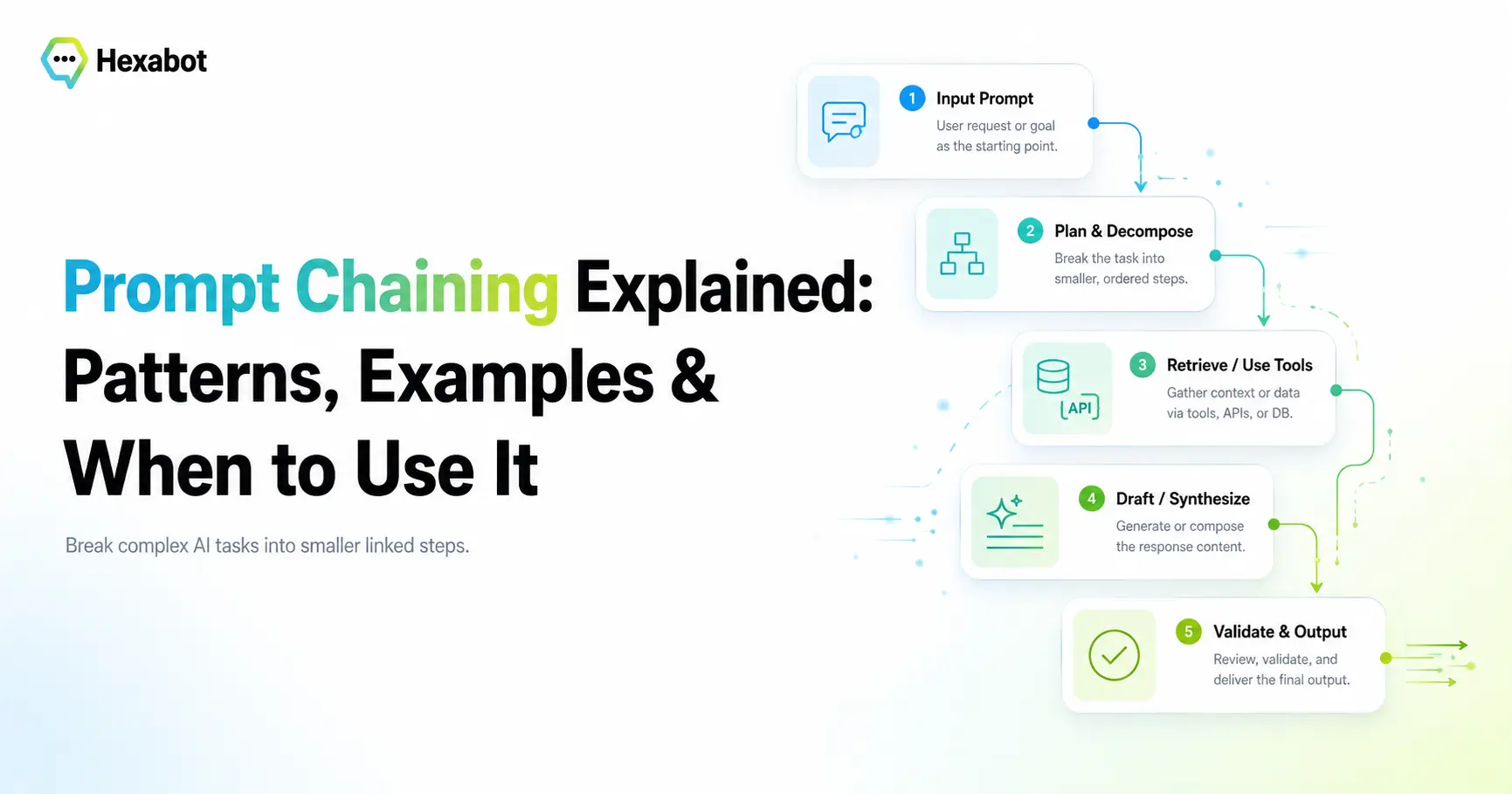
When people first start building with large language models, they tend to reach for one big prompt.
They write a long instruction, stuff in every rule and example they can think of, and hope the model does everything correctly in a single pass.
Sometimes it works. Often it does not.
The output misses a requirement, drifts off format, or quietly gets one step wrong in a way that is hard to notice. And when something breaks, you have no idea which part of that giant prompt was responsible.
There is a simpler, more reliable approach: prompt chaining.
What Is Prompt Chaining?
Prompt chaining is a technique where you break a complex task into a sequence of smaller prompts, and the output of each step becomes the input to the next.
Instead of asking a model to do everything at once, you split the work into clear stages. Each prompt has one job. Each step builds on the result of the previous one.
A single-prompt approach looks like this:
"Read this support email, detect the language, translate it to English, classify the issue, extract the order number, and write a reply."
A prompt chain breaks the same task into stages:
- Detect the language of the email.
- Translate it to English.
- Classify the type of issue.
- Extract the order number and key details.
- Draft a reply based on everything above.
Each step is small, testable, and easy to reason about. If step 3 misclassifies the issue, you can see it immediately and fix that step without touching the rest.
This is the same idea behind good software design: small functions with clear inputs and outputs are easier to build, debug, and trust than one enormous function that does everything.
Why Prompt Chaining Works
Prompt chaining improves results for a few practical reasons.
Each step has a narrow focus
Language models perform better when a prompt asks for one clear thing. Splitting a task reduces the chance that the model forgets a requirement or blends two instructions together.
Errors become visible
When the whole task runs in one prompt, a mistake is buried. When the task runs as a chain, you can inspect the output of every step. This makes problems obvious and debugging fast.
Steps become reusable
A "classify the request" step or a "summarize this document" step can be reused across many different workflows once it works well.
You can mix AI with regular code
Between two AI steps, you can run ordinary logic: validate a field, look something up in a database, apply a business rule, or call an API. The chain does not have to be all AI. The best chains combine reasoning with deterministic steps.
Quality compounds
Because each step starts from a cleaner, more structured input, the final result is usually more accurate than what a single sprawling prompt would produce.
Prompt Chaining vs a Single Prompt
A single prompt is fine when the task is genuinely simple: answer a question, rewrite a sentence, summarize a short paragraph.
Prompt chaining becomes valuable when the task has multiple distinct stages, especially when later stages depend on getting earlier ones right.
Use a single prompt when the task is one clear action.
Use a prompt chain when the task is really several actions in sequence.
A helpful test: if you find yourself writing "first do this, then do that, then based on that, do this other thing" inside one prompt, that is a strong sign the task wants to be a chain.
Common Prompt Chaining Patterns
Prompt chaining is not a single recipe. A few patterns show up again and again.
1. Sequential refinement
Each step improves or transforms the previous output. For example: generate a rough draft, then improve the tone, then check it against a set of rules. This is the most classic form of prompt chaining.
2. Extract, then act
One step pulls structured information out of unstructured text (an email, a document, a chat message). A later step uses that structured data to make a decision or generate a response. Splitting extraction from action keeps both steps clean.
3. Classify, then branch
A first step classifies the input. The result decides which prompt runs next. A billing question and a technical question can then follow completely different chains. This overlaps with routing, a closely related pattern where classification determines the path a workflow takes.
4. Generate, then validate
One step produces an answer. A second step checks it: is it well formed, does it follow the rules, is it grounded in the source material? If the check fails, the chain can retry or escalate. When the validation step feeds back into another generation step, you get an evaluator-optimizer loop that keeps improving output until it meets a quality bar.
5. Decompose, then combine
A hard question is split into sub-questions. Each is answered separately, and a final step combines the answers into a coherent response. When those sub-tasks are independent, they can even run at the same time as parallel agents rather than strictly one after another.
Prompt chaining is one of the core building blocks of larger agentic workflows — the point where these patterns combine with tools, memory, and human oversight to handle real, multi-step work.
A Concrete Example: Support Email Triage
Imagine an incoming support email:
"Bonjour, j'ai été facturé deux fois ce mois-ci pour la commande #48210 et je suis très mécontent."
A prompt chain can handle this cleanly, one step at a time.
Step 1 — Detect language The model identifies the message as French.
Step 2 — Translate The email is translated to English: "Hello, I was charged twice this month for order #48210 and I am very unhappy."
Step 3 — Classify the issue The model classifies this as a billing issue, with negative sentiment.
Step 4 — Extract details
A structured step pulls out the order number (#48210), the problem type (duplicate charge), and the urgency.
(Between steps 4 and 5, ordinary code can look up order #48210 in the database and confirm whether a duplicate charge really exists — no AI needed for that part.)
Step 5 — Draft a reply Using the confirmed data, the model writes a clear, empathetic response in the customer's original language.
Every step is inspectable. If the classification is ever wrong, you know exactly where to look. That transparency is one of the main reasons production AI needs more than prompts and tools — it needs structure you can observe and debug.
Best Practices for Prompt Chaining
A few habits make prompt chains far more reliable.
Give each step a single responsibility
If a step is trying to do two things, split it. One job per prompt is the whole point.
Pass structured data between steps
Where possible, have steps output structured formats (like JSON) rather than free-form text. Structured hand-offs are far more reliable than parsing prose in the next step.
Validate between steps
Do not blindly feed one step's output into the next. Check it first. Catching a bad result early stops errors from cascading down the chain.
Use code where code belongs
Not every step needs a model. Looking up a record, checking a threshold, or formatting a date is cheaper and more reliable as plain code. Reserve the model for the steps that actually need reasoning.
Watch cost and latency
Every step is another model call, which adds cost and time. Keep chains as short as the task truly requires. If two steps can safely be merged without hurting quality, merge them.
Handle failure explicitly
Decide what happens when a step fails or returns low-confidence output: retry, fall back to a default, or hand off to a human.
Common Pitfalls
- Chaining for the sake of it. If a task is genuinely simple, one prompt is better. Do not add steps that earn nothing.
- Losing context between steps. Later steps sometimes need information from earlier ones. Make sure the important context is carried forward, not dropped.
- No observability. If you cannot see the output of each step, you lose the biggest advantage of chaining. Log every stage.
- Ignoring the deterministic option. Some of your "steps" are not reasoning at all — they are lookups and rules. Keep those out of the model.
Where Prompt Chaining Fits in the Bigger Picture
Prompt chaining is a foundational pattern, but it is rarely the whole story. Real automations combine it with other techniques: routing to send different inputs down different paths, memory so a process can remember earlier decisions, tools so the AI can actually act on external systems, and human review for sensitive steps.
That combination is what turns a clever prompt into a dependable system. If you want to go deeper on how these pieces fit together, our guide to agentic workflows explained walks through the full picture, and AI agents vs AI workflows clarifies how autonomous agents differ from structured, chained processes.
A Working Example: The Triage Chain in Hexabot
Here is the same support-triage chain expressed as a real Hexabot workflow. It is a conversational workflow, triggered by an inbound customer message, so the runtime supplies the message as $input.text and there is no root inputs section to declare. Each stage is an AI action (ai_infer_object) with its own structured output schema, every prompt reads the output of the previous step through $output.<step>, and a final step sends the reply back to the customer — prompt chaining made concrete.
# Conversational Hexabot v3 workflow — prompt chaining with AI actions.
# Triggered by an inbound channel message; the runtime supplies trigger fields
# such as $input.text, so there is NO root `inputs` section.
# Configure type: conversational + name/publish state outside this YAML;
# replace the placeholder credential ID.

defs:
  triage_model:
    kind: model
    description: "Shared model binding reused by every AI step in the chain."
    settings:
      provider: openai
      model_id: gpt-5.2
      # Placeholder credential reference, not a secret value.
      api_key: "00000000-0000-4000-8000-000000000000"

  # Step 1 — detect the language of the inbound message.
  detect_language:
    kind: task
    action: ai_infer_object
    bindings:
      model: triage_model
    inputs:
      input_mode: prompt
      system: |
        You detect the language of a customer support message.
        Return only the fields allowed by the output schema.
      prompt: >
        = 'Message:\n' & $input.text
    settings:
      temperature: 0
      output_schema:
        type: object
        properties:
          language_code: { type: string, description: "ISO 639-1 code, e.g. 'fr'." }
          language_name: { type: string, description: "e.g. 'French'." }
        required: ["language_code", "language_name"]
        additionalProperties: false

  # Step 2 — translate to English, using the language detected in step 1.
  translate_to_english:
    kind: task
    action: ai_infer_object
    bindings:
      model: triage_model
    inputs:
      input_mode: prompt
      system: |
        You translate customer support messages into English.
        Preserve meaning, tone, and identifiers such as order numbers.
      prompt: >
        = 'Source language: ' & $output.detect_language.object.language_name &
          '\nMessage:\n' & $input.text
    settings:
      temperature: 0.1
      output_schema:
        type: object
        properties:
          english_text: { type: string }
        required: ["english_text"]
        additionalProperties: false

  # Step 3 — classify the issue from the English text produced in step 2.
  classify_issue:
    kind: task
    action: ai_infer_object
    bindings:
      model: triage_model
    inputs:
      input_mode: prompt
      system: |
        You classify customer support issues. Use only the allowed enum values.
      prompt: >
        = 'Customer message (English):\n' & $output.translate_to_english.object.english_text
    settings:
      temperature: 0.1
      output_schema:
        type: object
        properties:
          category: { type: string, enum: ["billing", "technical", "account", "shipping", "other"] }
          urgency: { type: string, enum: ["low", "normal", "high"] }
          sentiment: { type: string, enum: ["positive", "neutral", "negative"] }
        required: ["category", "urgency", "sentiment"]
        additionalProperties: false

  # Step 4 — extract structured order details from the same English text.
  extract_order_details:
    kind: task
    action: ai_infer_object
    bindings:
      model: triage_model
    inputs:
      input_mode: prompt
      system: |
        You extract order details from a support message.
        If a field is not present, return an empty string. Do not guess.
      prompt: >
        = 'Customer message (English):\n' & $output.translate_to_english.object.english_text
    settings:
      temperature: 0
      output_schema:
        type: object
        properties:
          order_number: { type: string }
          problem_type: { type: string }
        required: ["order_number", "problem_type"]
        additionalProperties: false

  # Step 5 — draft a reply, combining the outputs of steps 1, 2, 3, and 4.
  draft_reply:
    kind: task
    action: ai_infer_object
    bindings:
      model: triage_model
    inputs:
      input_mode: prompt
      system: |
        You write concise, empathetic support replies.
        Do not promise refunds or account changes; offer clear next steps.
      prompt: >
        = 'Write the reply in this language: ' & $output.detect_language.object.language_name &
          '\nIssue category: ' & $output.classify_issue.object.category &
          '\nUrgency: ' & $output.classify_issue.object.urgency &
          '\nOrder number: ' & $output.extract_order_details.object.order_number &
          '\nCustomer message (English):\n' & $output.translate_to_english.object.english_text
    settings:
      temperature: 0.3
      output_schema:
        type: object
        properties:
          reply: { type: string }
        required: ["reply"]
        additionalProperties: false

  # Step 6 — send the drafted reply back to the customer on the same channel.
  send_customer_reply:
    kind: task
    action: send_text_message
    inputs:
      text: "=$output.draft_reply.object.reply"

flow:
  - do: detect_language
  - do: translate_to_english
  - do: classify_issue
  - do: extract_order_details
  - do: draft_reply
  - do: send_customer_reply

outputs:
  language: "=$output.detect_language.object.language_name"
  category: "=$output.classify_issue.object.category"
  urgency: "=$output.classify_issue.object.urgency"
  order_number: "=$output.extract_order_details.object.order_number"
  reply: "=$output.draft_reply.object.reply"
  reply_sent: "=$exists($output.send_customer_reply.sent)"
A few things to notice about how this chain is wired:
- Triggered by a message, no
inputsblock. Because it is a conversational workflow, Hexabot hands the inbound message to the flow as$input.textand owns the trigger schema — so, per the DSL, the YAML declares no rootinputs. - Every step feeds the next.
translate_to_englishreads$output.detect_language.object.language_name;classify_issueandextract_order_detailsboth read the translatedenglish_text; anddraft_replycombines the outputs of four earlier steps. That hand-off through$output.<step>is the chain. - Structured outputs, not prose. Each step returns a typed object via
output_schema, so the next prompt consumes clean fields instead of parsing free text — exactly the "pass structured data between steps" best practice from earlier. - One model, bound once. The
triage_modeldef is declared once and reused by every task, and classification and extraction run at low temperature for stable, repeatable results. - It closes the loop. The final
send_customer_replystep is a conversationalsend_text_messageaction that returns the drafted reply to the customer on the same channel. And becauseclassify_issueandextract_order_detailsonly depend on the translation, they could run as aparallelblock instead of in sequence — with a non-AI action looking up the extractedorder_numberin your database before the reply, so the model never guesses whether the order exists.
Building Prompt Chains with Hexabot
Hexabot is a self-hosted AI chatbot and workflow automation platform designed for exactly this kind of work. Instead of gluing prompts together with custom scripts, you can model a prompt chain as a real workflow: each AI step is a first-class action with structured inputs and outputs, you can drop deterministic actions and business rules between steps, add memory and retrieval where context is needed, and keep a human in the loop for anything sensitive.
You can build the chain visually or define it as portable YAML for version control and review — and inspect the output of every step, so your agentic workflows stay observable and reliable in production. To start building locally, follow the Hexabot quickstart.