Agentic Workflows Explained: From Chatbots to Business Automation
Learn how agentic workflows combine AI reasoning, business rules, tools, memory, and human oversight to move beyond conventional chatbots.

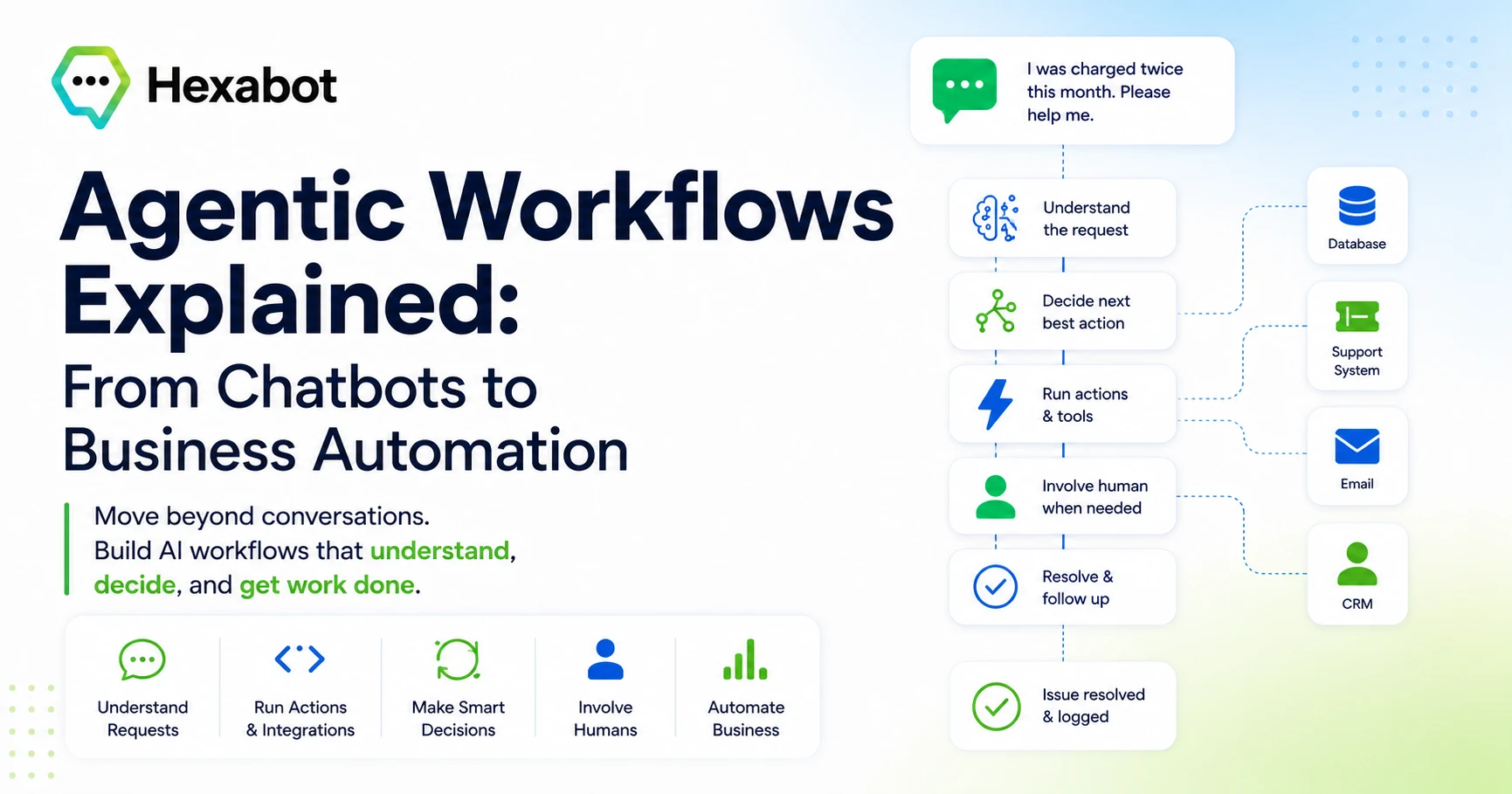
For years, chatbots were mostly seen as a better interface for answering questions.
A user types a message. The bot responds. Sometimes it understands the intent. Sometimes it follows a predefined flow. Sometimes it connects to a knowledge base. But in most cases, the interaction stays inside the conversation.
That is useful, but it is also limited.
Modern businesses do not only need software that can answer questions. They need systems that can understand context, make decisions, trigger actions, coordinate tools, involve humans when needed, and move work forward.
This is where agentic workflows come in.
Agentic workflows represent a new step in AI automation. They combine the conversational intelligence of AI agents with the structure, reliability, and repeatability of workflow automation.
Instead of building a chatbot that simply replies, you can build an AI-powered workflow that actually helps execute business processes.
What Are Agentic Workflows?
An agentic workflow is an automation process where AI is not only used to generate text, but also to reason, decide, and act within a structured workflow.
In a traditional workflow, every step is usually predefined:
When this happens, do that. If the status is “urgent,” send an email. If the form is complete, create a ticket.
In an agentic workflow, AI can participate in more flexible parts of the process:
Understand what the user is asking. Classify the request. Extract important information. Decide which action is relevant. Call the right tool. Summarize the result. Ask for human approval when the situation is sensitive.
The key idea is simple:
Agentic workflows combine AI reasoning with workflow control.
They are not fully autonomous systems running without boundaries. A good agentic workflow still has structure, rules, permissions, fallback paths, and observability.
That is what makes it useful for real business automation.
From Chatbots to Agentic Workflows
To understand agentic workflows, it helps to look at how chatbot technology has evolved.
1. Rule-Based Chatbots
The first generation of chatbots relied heavily on predefined rules.
They worked well for simple scenarios:
“Press 1 for sales.” “Press 2 for support.” “Choose one of these options.”
In visual chatbot builders, this became a flow-based experience. You could design blocks, buttons, quick replies, conditions, and scripted answers.
This was useful for FAQs, lead qualification, appointment booking, and simple customer support.
But rule-based bots had a clear limitation: they could only handle what the builder anticipated.
When users wrote something unexpected, the bot usually failed.
2. AI-Powered Chatbots
Then came AI-powered chatbots.
With natural language understanding and large language models, chatbots became much better at understanding user messages and generating human-like responses.
Instead of forcing users to follow strict menus, AI chatbots could understand open-ended questions such as:
“I received the wrong product, and I want to know what to do.” “Can you help me compare your pricing plans?” “I need to update my subscription but I cannot access my account.”
This made chatbots more flexible and useful.
But many AI chatbots still remain mostly conversational. They answer, explain, summarize, and guide.
That is valuable, but businesses often need something more.
They need the AI to connect to systems and complete tasks.
3. Agentic Workflows
Agentic workflows go beyond conversation.
They allow AI to become part of a broader operational process.
For example, instead of only replying to a customer complaint, an agentic workflow can:
-
Understand the customer’s issue.
-
Detect urgency and sentiment.
-
Retrieve the customer profile from the CRM.
-
Check order status.
-
Create a support ticket.
-
Suggest a response.
-
Escalate the case to a human agent if needed.
-
Log the interaction.
-
Trigger a follow-up email.
The chatbot is no longer just a chat interface.
It becomes the entry point into a business automation system.
Why Agentic Workflows Matter for Business Automation
Most businesses already use many tools: CRMs, ERPs, ticketing systems, spreadsheets, databases, analytics tools, communication platforms, internal knowledge bases, and custom applications.
The problem is that these tools often remain disconnected.
Employees spend a lot of time moving information from one system to another, interpreting requests, checking rules, writing summaries, sending updates, and following repetitive procedures.
Agentic workflows can reduce that friction.
They allow businesses to automate processes that are too flexible for traditional automation, but too repetitive to remain fully manual.
This is especially useful for workflows that involve:
-
Unstructured text
-
Human language
-
Decision-making
-
Multiple tools
-
Business rules
-
Approval steps
-
Exceptions and fallback paths
In other words, agentic workflows are useful when the process is not just “click here, copy there.”
They are useful when the automation needs to understand what is happening.
A Simple Example: Customer Support Triage
Let’s take a practical example: customer support triage.
A traditional chatbot may ask:
“What type of issue are you facing?” “Billing, technical support, or account access?”
Then it follows a fixed path.
An agentic workflow can handle the same situation more intelligently.
A customer writes:
“I was charged twice this month, and I’m really frustrated because I already contacted support last week.”
The workflow can:
-
Analyze the message Detect that this is a billing issue, with negative sentiment and a possible repeated complaint.
-
Extract useful data Identify the billing concern, account reference, date, and urgency.
-
Check business systems Look up the customer subscription, payment history, and previous tickets.
-
Decide the next step If there really is a duplicate payment, create a refund request. If the case is unclear, escalate to a human agent.
-
Generate a response Draft a clear, empathetic message for the customer.
-
Involve a human when needed Ask a support agent to approve the refund or review the case.
-
Update records Add notes to the CRM and support system.
This is not just a chatbot conversation.
This is a business workflow powered by AI.
The Core Building Blocks of an Agentic Workflow
A well-designed agentic workflow usually includes several important components.
1. Trigger
A trigger starts the workflow.
It can be a user message, a form submission, an incoming email, a webhook, a scheduled event, a file upload, or an internal system event.
For chatbot-based automation, the trigger is often a message from a customer or internal user.
For business automation, the trigger could be something like:
“A new lead was created.” “An invoice was uploaded.” “A support ticket was received.” “A weekly report must be generated.”
2. Context
AI needs context to act properly.
Context can include the user message, previous conversation history, customer profile, business rules, documents, permissions, workflow state, and data from external systems.
Without context, the AI may generate a plausible answer but fail to produce a useful business outcome.
Good agentic workflows provide the AI with the right context at the right time.
Not everything needs to be sent to the model. The workflow should control what information is relevant, what data is sensitive, and what should remain outside the AI reasoning step.
3. Reasoning Step
This is where the AI interprets the situation.
The reasoning step may classify a request, extract entities, summarize a document, decide between possible paths, generate a response, or evaluate whether human intervention is required.
For example:
Is this request urgent? What department should handle it? Is the user asking for information or requesting an action? Is there enough information to proceed? Should this be escalated?
This is where the “agentic” part becomes useful.
The AI is not only matching keywords. It is interpreting meaning.
4. Actions and Tools
Actions are what allow the workflow to do real work.
An action can be anything the system is allowed to execute:
Create a ticket. Send an email. Search a database. Update a CRM record. Call an API. Retrieve documents. Generate a report. Notify a human agent.
This is one of the biggest differences between a simple AI chatbot and an agentic workflow.
A chatbot answers. An agentic workflow can act.
5. Conditions and Business Rules
Not every decision should be left to the AI.
Business automation requires control.
For example:
Refunds above a certain amount require human approval. Legal requests must always be escalated. VIP customers should be routed to a priority queue. Sensitive data should never be sent to external systems. Low-confidence AI decisions should trigger fallback paths.
Agentic workflows work best when AI reasoning is combined with deterministic rules.
The AI handles ambiguity. The workflow handles structure.
6. Human-in-the-Loop
In real business environments, full automation is not always the goal.
Some decisions require human judgment, accountability, or approval.
A strong agentic workflow should know when to stop and involve a person.
This is especially important for sensitive areas such as finance, healthcare, legal operations, HR, customer complaints, compliance, and high-value transactions.
Human-in-the-loop design makes agentic workflows safer and more trustworthy.
7. Memory and State
Business processes often happen over time.
A workflow may need to remember previous steps, decisions, user preferences, pending approvals, or past interactions.
This is where state management becomes important.
For example:
Has the customer already provided their order number? Was the refund request already created? Did a human agent approve the escalation? What was the last action executed by the workflow?
Without memory and state, AI automation becomes fragile.
With them, workflows become more reliable and easier to audit.
8. Observability and Logs
Businesses need to understand what happened inside an automation.
A good agentic workflow should provide visibility into:
Which steps were executed. What the AI decided. What data was used. Which tools were called. Where the workflow failed. When a human was involved. How much the AI step cost.
This is important for debugging, compliance, optimization, and trust.
AI automation should not be a black box.
Agentic Workflows vs Traditional Automation
Traditional automation is excellent when the process is predictable.
For example:
When a payment is received, send an invoice. When a user signs up, create an account. Every Monday, generate a report.
These workflows are deterministic. The system knows exactly what to do.
Agentic workflows are better when the process involves ambiguity.
For example:
Read this customer complaint and decide where to route it. Analyze this document and extract the relevant obligations. Review this conversation and summarize the next best action. Understand this internal request and trigger the right process.
The best systems combine both approaches.
You do not want an AI model to reason through every small deterministic step. That would be slow, expensive, and unreliable.
Instead, use AI where intelligence is needed, and use traditional workflow logic where structure is needed.
That balance is what makes agentic workflows practical.
Agentic Workflows vs AI Agents
The terms “AI agent” and “agentic workflow” are often used together, but they are not exactly the same.
An AI agent is usually a system that can reason, use tools, and pursue a goal.
An agentic workflow is a structured process that uses agent-like capabilities inside a controlled workflow.
The difference is important.
A fully autonomous agent may decide what to do next dynamically. That can be powerful, but also harder to control.
An agentic workflow gives the AI a defined role inside a broader process.
For business automation, this is often the better approach.
It gives you the benefits of AI reasoning without losing control over the process.
Common Use Cases for Agentic Workflows
Agentic workflows can be applied across many business areas.
Customer Support
AI can classify support requests, retrieve account information, draft answers, create tickets, escalate urgent cases, and summarize conversations for human agents.
Sales Operations
Agentic workflows can qualify leads, enrich company data, personalize outreach, update the CRM, schedule follow-ups, and notify sales teams when a lead is ready for human contact.
HR and Internal Operations
AI can answer employee questions, guide onboarding, collect missing documents, route internal requests, and summarize HR policies in a controlled way.
Knowledge Management
Agentic workflows can ingest documents, organize knowledge, answer questions based on internal content, detect outdated information, and route unanswered questions to subject-matter experts.
Finance and Administration
AI can help process invoices, extract key information, check missing fields, compare documents against rules, and prepare approvals.
IT and DevOps
Agentic workflows can triage incidents, summarize logs, open internal tickets, suggest runbooks, notify teams, and track resolution steps.
Why Not Everything Should Be Agentic
Agentic workflows are powerful, but they should not be used everywhere.
Some tasks are simple enough to remain deterministic.
For example, you do not need an AI model to decide how to send a password reset email. You do not need an AI agent to copy a field from one system to another. You do not need reasoning for every API call.
Overusing AI can create unnecessary cost, latency, and unpredictability.
A good agentic workflow design asks:
Where do we actually need reasoning? Where do we need strict rules? Where do we need human approval? Where can we use simple code instead of AI? Where is the business risk too high for full automation?
The goal is not to make everything autonomous.
The goal is to make business processes smarter, faster, and more reliable.
The Main Challenges of Agentic Workflows
Agentic workflows are promising, but they introduce new challenges.
Reliability
AI models can misunderstand context, produce incorrect outputs, or make decisions with too much confidence.
This is why validation, fallback paths, and human review are important.
Cost Control
If every step requires a large language model call, the workflow can become expensive quickly.
A good architecture should use AI only where it adds value and rely on deterministic logic for repetitive operations.
Security
Agentic workflows may connect to sensitive systems.
Access control, data filtering, permissions, and audit logs are essential.
The AI should only be allowed to use the tools and data required for its role.
Governance
Businesses need to know who is responsible when an AI-assisted process makes a decision.
Clear rules, approval flows, and traceability are necessary, especially in regulated industries.
User Experience
Even powerful automation can fail if the experience is confusing.
Users should understand what the AI can do, what it cannot do, and when a human will take over.
How to Start Building Agentic Workflows
You do not need to automate an entire business process from day one.
The best approach is to start with a focused use case.
Choose a process that has:
Frequent repetition. Clear business value. Some natural language input. A need for classification or decision-making. Clear rules and escalation paths. A measurable outcome.
Customer support triage is often a good starting point because it is easy to understand and has visible business impact.
Then define the workflow step by step:
-
What triggers the workflow?
-
What information does the AI need?
-
What decisions should the AI make?
-
What actions can the system execute?
-
Which rules must always be enforced?
-
When should a human be involved?
-
What should be logged?
-
How will success be measured?
This keeps the automation practical.
It also prevents the common mistake of giving the AI too much freedom too early.
The Future of Business Automation Is Hybrid
Agentic workflows point toward a more realistic future for AI in business.
Not a future where AI magically replaces every tool and every employee.
Not a future where businesses give unlimited autonomy to a black-box agent.
Instead, the future is hybrid:
AI for understanding. Workflows for structure. Tools for execution. Humans for judgment. Logs for trust. Rules for control.
This is the real shift from chatbots to business automation.
Chatbots made software easier to talk to. Agentic workflows make software easier to work with.
They turn AI from a conversational interface into an operational layer that can support real business processes.
Final Thoughts
Agentic workflows are one of the most important ideas in modern AI automation because they solve a practical problem.
Businesses do not only need smarter chatbots. They need AI systems that can participate in real work while remaining controlled, observable, and safe.
The best agentic workflows are not the ones that let AI do everything.
They are the ones that combine AI reasoning with clear workflow design, reliable actions, business rules, and human oversight.
That is how we move from simple chatbot interactions to meaningful business automation.
Building Agentic Workflows with Hexabot
Hexabot.ai is a self-hosted AI chatbot and workflow automation platform designed to help developers build conversational, agentic, and business-oriented automations. With Hexabot, teams can combine AI reasoning, workflow logic, custom actions, integrations, and human control to move beyond simple chatbot responses and build real automation experiences for customer support, internal operations, lead qualification, knowledge management, and more.