Introducing the Hexabot AI Coding Agent Action
Discover the Hexabot AI Coding Agent action, which runs Codex, Claude Code, OpenCode, and Grok Build inside isolated Docker sandboxes.

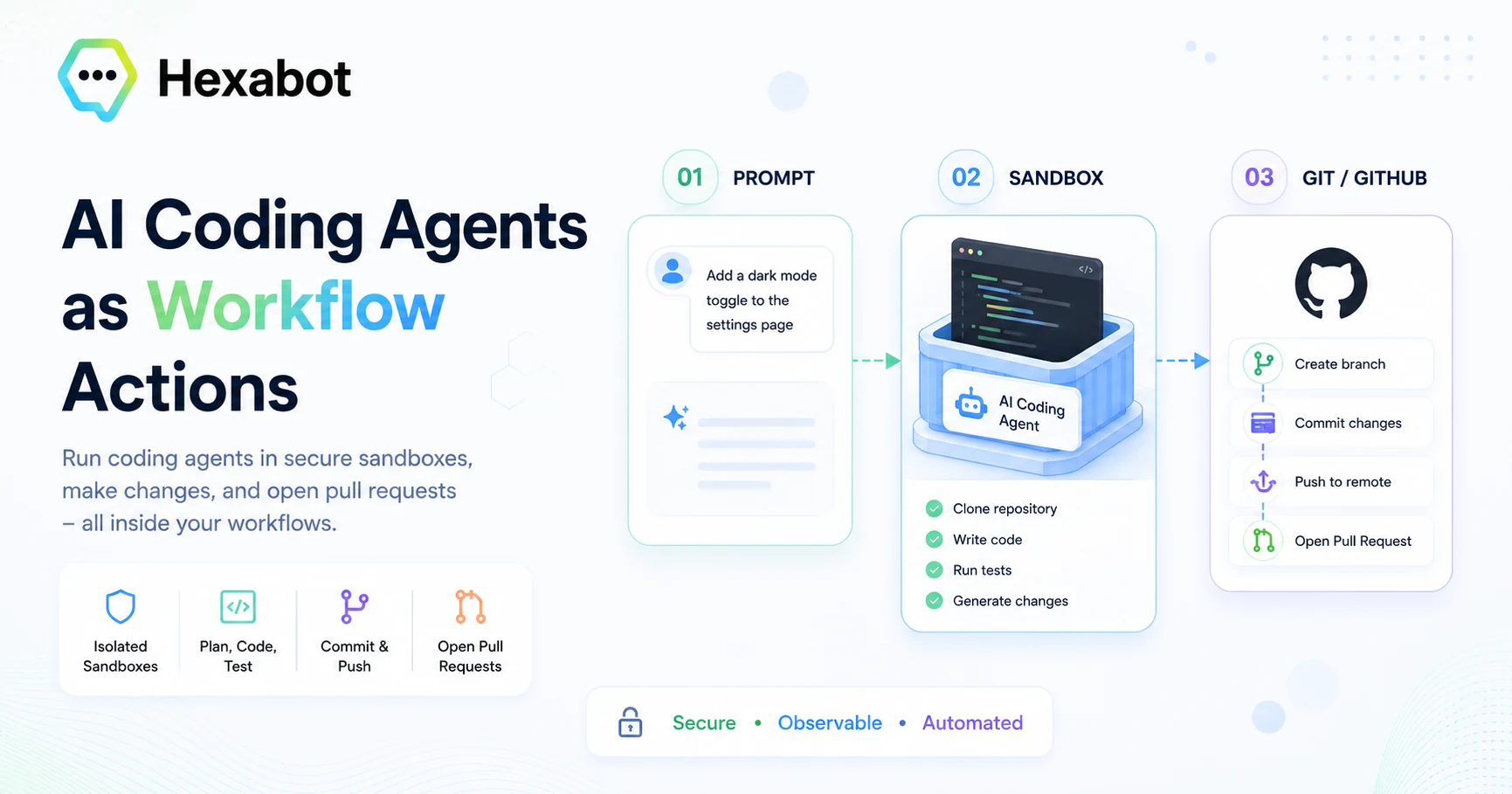
AI coding agents are quickly becoming part of the modern software development toolkit.
They can inspect repositories, write code, run tests, debug problems, and prepare pull requests. But most coding agents are still used as standalone tools through an IDE, terminal, or dedicated chat interface.
That works well for individual developers.
It becomes more limiting when you want to integrate coding agents into repeatable, multi-step automation.
What if a coding agent could be invoked like any other workflow action?
What if it could receive structured inputs, run in an isolated environment, preserve its state across multiple steps, return file changes and diffs, and participate in conditional workflows, loops, approval processes, and conversations?
This is the idea behind the new Hexabot AI Coding Agent action.
The extension brings repository-aware AI coding agents into Hexabot workflows, allowing teams to automate software development tasks while keeping execution isolated, observable, and configurable.
What is the AI Coding Agent action?
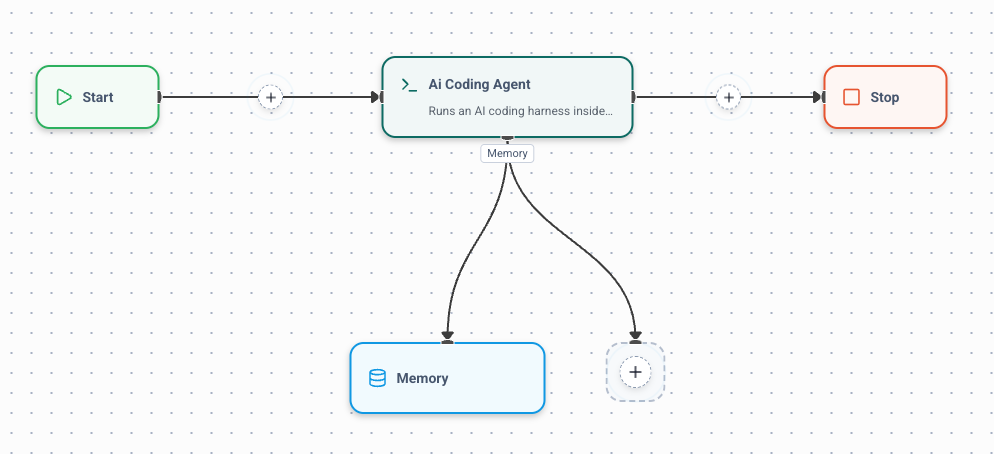
The AI Coding Agent action is a Hexabot workflow extension registered under the following action name:
ai_coding_agent
It runs an AI coding harness inside a Docker-backed sandbox powered by TanStack AI.
The action can:
-
Clone a Git repository
-
Create an empty workspace
-
Run an AI coding agent inside a Docker container
-
Preserve agent sessions across workflow steps
-
Reuse a sandbox throughout a conversation
-
Inject API and Git credentials securely
-
Collect changed files and code diffs
-
Produce structured implementation plans
-
Push branches and open GitHub pull requests
-
Return structured output to downstream workflow steps
This means a coding agent is no longer limited to a single prompt-and-response interaction.
It becomes a reusable building block inside a larger automation.
Supported AI coding harnesses
The action currently supports four coding harnesses:
-
Codex
-
Claude Code
-
OpenCode
-
Grok Build
The harness and model are configured at the workflow-task level.
For example:
defs:
  implement_feature:
    kind: task
    action: ai_coding_agent
    inputs:
      prompt: =$input.text
      source_type: github
      repository: username/repo
      ref: main
    settings:
      harness: codex
      model: gpt-5.3-codex
      agent_api_key: <hexabot-credential-id>
Another task in the same workflow could use Claude Code or OpenCode instead.
This makes the extension provider-flexible. Workflow authors can choose a different harness depending on the task, model availability, cost, or project requirements.
Why make coding agents available as workflow actions?
A standalone coding agent is useful for tasks such as:
-
Implementing a feature
-
Explaining a codebase
-
Fixing a bug
-
Writing tests
-
Refactoring a module
But real software development processes often involve much more than one agent run.
A complete workflow might need to:
-
Receive a request from Slack, an issue tracker, or an API.
-
Classify the request.
-
Ask the user for missing requirements.
-
Generate an implementation plan.
-
Ask for approval.
-
Implement one task at a time.
-
Run tests.
-
Analyze the resulting diff.
-
Create a branch and commit.
-
Open a pull request.
-
Notify the requester.
A coding model alone does not provide this orchestration.
Hexabot adds the workflow layer around the agent.
The coding agent handles repository-level reasoning and execution, while Hexabot controls when it runs, what information it receives, what happens next, and how users interact with the process.
Running agents inside isolated Docker sandboxes
AI coding agents need access to a development environment.
They may need to:
-
Read and modify files
-
Install dependencies
-
Execute package-manager commands
-
Run test suites
-
Use Git
-
Access external services
-
Start local development servers
Running these operations directly inside the main Hexabot process would create unnecessary security and stability risks.
The AI Coding Agent action therefore runs each coding harness inside a Docker-backed TanStack AI sandbox.
The selected coding harness is installed automatically when it is not already available inside the image.
You can also provide a custom Docker image containing the exact runtime, dependencies, compilers, databases, or development tools required by your project.
Repository and workspace sources
The action supports three workspace source types:
GitHub repository
Use a GitHub owner and repository name or a GitHub URL:
inputs:
  source_type: github
  repository: username/repo
  ref: main
Generic Git repository
Use an HTTPS Git URL for repositories hosted on GitLab, Bitbucket, or a self-hosted Git service:
inputs:
  source_type: git
  repository: https://git.example.com/team/project.git
  ref: develop
Empty workspace
The agent can also start without cloning a repository:
inputs:
  source_type: none
  prompt: Create a new TypeScript REST API using NestJS.
This is useful for scaffolding proofs of concept, generating sample projects, or creating code from scratch.
Reusable and disposable sandboxes
The action supports two sandbox lifecycle strategies.
Per-run lifecycle
With per_run, the action creates a new container for every execution.
The container is destroyed when the agent finishes.
settings:
  sandbox_lifecycle: per_run
This provides stronger isolation between tasks and is appropriate when runs are unrelated.
Per-thread lifecycle
With per_thread, the same sandbox is reused throughout a Hexabot conversation thread.
settings:
  sandbox_lifecycle: per_thread
  keep_alive: 30m
This is useful when a development workflow spans several agent calls.
For example:
Plan the feature
      ↓
Implement module one
      ↓
Implement module two
      ↓
Write tests
      ↓
Open the pull request
Each step sees the same workspace, including changes produced by previous steps.
The sandbox is cleaned up when:
-
The conversation thread closes
-
The configured idle timeout expires
-
The Hexabot application shuts down
When no conversation thread is available, the action automatically falls back to a per-run sandbox.
Preserving the coding-agent session
Reusing a workspace preserves files, but many coding harnesses also maintain their own agent session.
The action can persist the harness session ID using Hexabot thread-scoped memory.
The default memory slug is:
ai_coding_agent
The session ID can be read using the following workflow expression:
=$context.memory.ai_coding_agent.sessionId
When a later action runs within the same thread, it can resume the previous coding-agent session.
This gives the agent continuity across planning, implementation, testing, and delivery steps.
Instead of repeatedly rediscovering the project and previous decisions, the harness can continue from the same context.
Building prompts from direct input or conversation history
The action supports two input modes.
Prompt mode
Prompt mode sends a direct instruction to the coding agent:
inputs:
  input_mode: prompt
  prompt: Add unit tests for the authentication service.
The prompt can also be generated from previous workflow outputs:
inputs:
  prompt: >-
    ='Implement this task: ' &
    $iteration.item.title &
    '. Details: ' &
    $iteration.item.description
History mode
History mode builds the coding task from recent messages in the current conversation:
inputs:
  input_mode: history
  messages_limit: 10
This is useful for conversational developer assistants where the user discusses requirements over several messages before the coding agent starts working.
Hexabot can also inject selected memory into the system prompt, allowing project preferences or user-provided context to follow the task.
Structured plans and deterministic workflow loops
One of the most important features of the action is its structured plan contract.
Natural-language agent responses are useful for humans, but workflow engines need predictable data.
The action can instruct the coding harness to emit a structured hexabot-state block containing:
-
A high-level plan
-
A list of todos
-
Optional status information
For example:
{
  "plan": "Implement the dashboard using three independent React components.",
  "todos": [
    {
      "title": "Create the metrics summary",
      "description": "Display the main KPI cards.",
      "status": "pending"
    },
    {
      "title": "Create the activity chart",
      "description": "Visualize activity over time.",
      "status": "pending"
    },
    {
      "title": "Create the recent-events table",
      "description": "List the latest system events.",
      "status": "pending"
    }
  ]
}
The action validates and parses this state before returning it to the workflow.
Three plan modes are available:
Off
settings:
  plan_mode: off
No structured plan is requested.
This is appropriate for focused execution tasks such as fixing one bug or running tests.
Optional
settings:
  plan_mode: optional
The action asks for a structured plan and reports whether the agent provided a valid one.
A missing plan does not fail the task.
Required
settings:
  plan_mode: required
The action requires a valid plan. If the agent does not return one, the run is marked unsuccessful.
This allows a workflow to branch safely:
- do: plan_feature

- conditional:
    when:
      - condition: =$output.plan_feature.plan_status = 'ok'
        steps:
          - loop:
              type: for_each
              for_each:
                item: task
                in: =$output.plan_feature.todos
              steps:
                - do: implement_task
This pattern is useful for decomposing large tasks into smaller, observable iterations rather than giving an agent one broad instruction and hoping for the best.
Secure credential injection
Coding agents often need two types of credentials:
-
A model or coding-harness API key
-
A Git token for cloning, pushing, or opening pull requests
These credentials should not be written directly into workflow YAML.
The action uses the Hexabot credential store to resolve them at runtime.
settings:
  agent_api_key: <model-credential-id>
  github_token: <git-credential-id>
The resolved values are injected into the sandbox environment.
Default environment-variable names include:
| Harness | Default environment variable |
|---|---|
| Codex | CODEX_API_KEY |
| Claude Code | ANTHROPIC_API_KEY |
| Grok Build | XAI_API_KEY |
| OpenCode | OPENAI_API_KEY |
Git credentials are exposed through GH_TOKEN by default.
Repository URLs containing embedded usernames or passwords are rejected, encouraging workflow authors to keep secrets inside the credential store.
Git operations and pull-request creation
When a Git credential is configured, the action prepares the sandbox for authenticated Git operations.
It can configure:
-
The repository as a safe Git directory
-
The commit author name
-
The commit author email
-
An HTTPS credential helper
-
The GitHub CLI
Example configuration:
settings:
  github_token: <git-credential-id>
  git_user_name: username
  git_user_email: your@email.com
  install_gh: true
A coding agent can then:
git checkout -b feature/improve-dashboard
git add .
git commit -m "feat: improve dashboard"
git push -u origin feature/improve-dashboard
gh pr create --fill
The Git credential helper reads the token from the environment at push time. The token itself is not written into the repository configuration.
Generic HTTPS Git hosts are supported for cloning and pushing. Pull-request creation through gh is specific to GitHub.
Command and capability policies
Sandboxing is an important first layer of protection, but workflow authors may still want to restrict what the coding agent can execute.
The action supports policies for:
-
Allowed commands
-
Commands requiring approval
-
Denied commands
-
File-write access
-
Network access
Example:
settings:
  policy_default: allow
  deny_commands:
    - sudo *
    - rm -rf *
    - shutdown *
    - reboot *
  file_write_policy: allow
  network_policy: allow
The default denied commands include several destructive system operations.
For read-only tasks, file writes can be blocked:
settings:
  file_write_policy: deny
For tasks that should not access external services:
settings:
  network_policy: deny
These controls make it possible to configure different levels of autonomy for different workflow steps.
A code-question task may be read-only, while an approved implementation task may allow file modifications and network access.
Collecting file changes and diffs
The action does more than return the agent’s final message.
It can capture sandbox file events and code diffs.
The structured output may include:
{
  "files": [
    {
      "path": "src/components/Dashboard.tsx",
      "type": "change"
    },
    {
      "path": "src/components/Dashboard.test.tsx",
      "type": "create"
    }
  ],
  "diffs": [
    {
      "path": "src/components/Dashboard.tsx",
      "diff": "...",
      "truncated": false
    }
  ]
}
This information can be consumed by later workflow tasks.
For example, a downstream step could:
-
Summarize the changes
-
Check whether sensitive files were modified
-
Run an AI code review
-
Generate release notes
-
Request human approval
-
Store an audit record
-
Send the diff to a Slack channel
The action also supports output-size limits to avoid returning excessively large agent responses or diffs.
Streaming and execution metadata
During a run, the action processes the event stream returned by TanStack AI.
It can collect:
-
Text responses
-
Run errors
-
Completion reasons
-
Token usage
-
Tool-call events
-
File-change events
-
Harness session IDs
-
Compact event counts
The final output includes identifiers such as:
-
thread_id -
run_id -
session_id -
sandbox_id
These fields make executions easier to correlate and debug inside larger workflows.
Example use cases
The AI Coding Agent action is not tied to one communication channel or one software-development process.
It can be used in many types of automation.
Feature implementation
Receive a specification, inspect the repository, create a plan, implement the feature, run tests, and prepare a pull request.
Bug investigation
Run the agent in read-only mode to inspect a bug report and produce a root-cause analysis before any code is modified.
Approved bug fixing
After a human approves the proposed correction, run a second task that applies the smallest safe change and adds a regression test.
Test generation
Ask the coding agent to inspect a module and add missing unit or integration tests.
Documentation maintenance
Detect changed APIs or configuration options and update the relevant Markdown documentation.
Dependency upgrades
Run scheduled workflows that update dependencies in a sandbox, execute tests, and open pull requests when verification succeeds.
Codebase Q&A
Expose a repository-aware assistant through Slack, Discord, a web widget, or another Hexabot channel.
Automated prototyping
Start from an empty workspace and ask the agent to scaffold a small application, API, command-line tool, or proof of concept.
Multi-agent development pipelines
Use separate steps or harnesses for planning, implementation, testing, security analysis, and review.
A proof of concept: Slack2PR
To demonstrate what can be built with the action, we created Slack2PR.
Slack2PR is a Hexabot workflow that lets a user mention a bot in Slack and request a feature, report a bug, or ask a question about a repository.
The workflow uses the AI Coding Agent action to:
-
Inspect the target repository
-
Create structured implementation plans
-
Implement tasks iteratively
-
Write tests
-
Investigate bugs in read-only mode
-
Apply approved fixes
-
Open GitHub pull requests
Slack2PR is one example of how the action can be used.
The important part is not Slack itself. The same coding-agent action can be triggered by an API call, a scheduled workflow, another chatbot channel, an issue-tracking event, or an internal business process.
You can watch the proof-of-concept video here:
Watch the AI Coding Agent demo on YouTube
Installation
Install the package in the same workspace that runs @hexabot-ai/api:
npm install hexabot-action-ai-coding-agent
Restart the Hexabot API after installation.
You can configure it using the visual workflow editor or directly in workflow YAML.
Minimal workflow example
The following task asks a Codex agent to inspect a repository and implement a change:
defs:
  implement_change:
    kind: task
    action: ai_coding_agent
    inputs:
      input_mode: prompt
      prompt: =$input.text
      source_type: github
      repository: Hexastack/Hexabot
      ref: main
    settings:
      harness: codex
      model: gpt-5.3-codex
      agent_api_key: <model-credential-id>
      github_token: <git-credential-id>
      install_gh: true
      sandbox_lifecycle: per_run
      plan_mode: optional
The output becomes available to later tasks through:
$output.implement_change
A later task can inspect fields such as:
$output.implement_change.ok
$output.implement_change.text
$output.implement_change.files
$output.implement_change.diffs
$output.implement_change.plan
$output.implement_change.todos
$output.implement_change.error
Coding agents as workflow infrastructure
The biggest opportunity around AI coding agents is not simply generating more code.
It is integrating software-development capabilities into broader automation systems.
A coding agent can become one task inside a workflow that also includes:
-
Conversation
-
Requirements gathering
-
Classification
-
Memory
-
Approvals
-
Business rules
-
Notifications
-
Scheduling
-
Human escalation
-
Audit logs
-
External APIs
The Hexabot AI Coding Agent action provides the bridge between repository-aware coding harnesses and workflow orchestration.
It gives coding agents an isolated workspace, persistent context, structured output, configurable policies, and access to the rest of the Hexabot ecosystem.
That makes it possible to move from one-off coding prompts to repeatable software-development automation.
Explore the project: