Use 100+ LLM Providers in Hexabot with LiteLLM
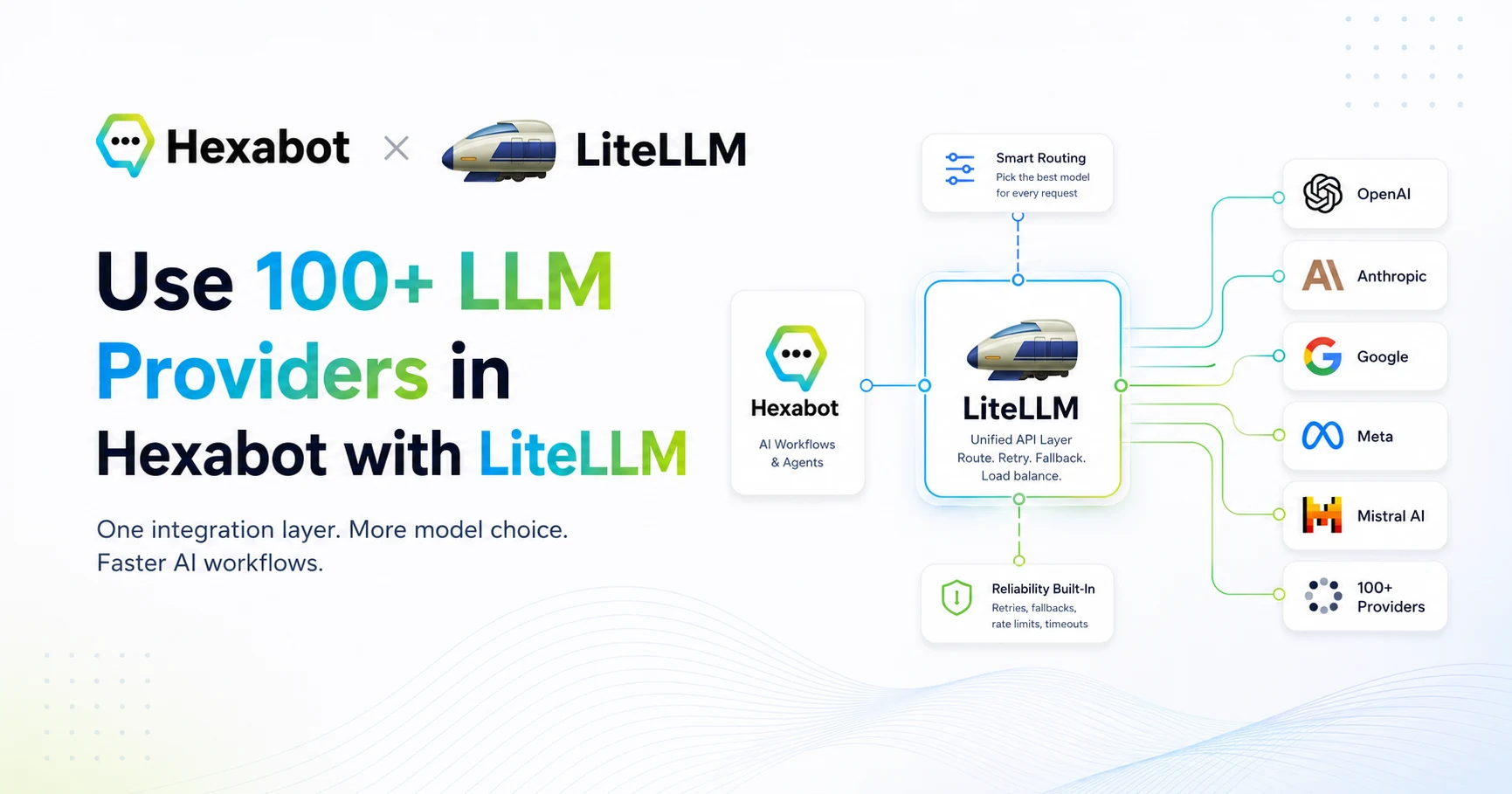
Learn how Hexabot uses LiteLLM to connect built-in AI actions to 100+ model providers through one OpenAI-compatible gateway.

AI automation is moving fast, but one problem keeps coming back for developers and teams: LLM provider fragmentation.
One project uses OpenAI. Another needs Anthropic. A customer asks for Azure OpenAI. A privacy-sensitive workflow needs Ollama or another self-hosted model. A production setup needs fallback routing, usage tracking, rate limits, and better provider control.
This is exactly where LiteLLM shines.
We are excited to share that Hexabot now supports LiteLLM as an additional LLM provider for Hexabot's built-in AI actions:
-
ai_agent -
ai_infer_object -
ai_generate_reply
This contribution was made thanks to Aarish Alam from the LiteLLM team, who opened the pull request adding LiteLLM support to Hexabot.
For Hexabot users, this means one simple thing:
You can now connect Hexabot to a LiteLLM gateway and route your AI workflows across 100+ LLM providers from one unified, OpenAI-compatible interface.
Let’s break down what this means, why it matters, and how to start using it.
What Is LiteLLM?
LiteLLM is an AI gateway that gives developers and teams a unified way to call many different LLM providers through a single interface.
Instead of writing separate integration logic for OpenAI, Anthropic, Azure OpenAI, Bedrock, Gemini, Ollama, Mistral, and other providers, LiteLLM lets you centralize model access behind one gateway.
In practice, LiteLLM can help you:
-
Use many LLM providers behind one API.
-
Route requests to different models depending on your needs.
-
Add fallback logic when a provider is unavailable.
-
Track usage and costs.
-
Create virtual keys for different users, teams, or projects.
-
Keep model access centralized instead of spreading API keys across every app.
For developers building AI products, this is a big deal.
The more your application grows, the less you want your business logic to depend directly on one model provider. You want your workflows, agents, and automations to stay stable while your model infrastructure evolves.
That is the role LiteLLM plays: it becomes the gateway between your application and the wider LLM ecosystem.
What Changed in Hexabot?
Hexabot already includes built-in AI actions that allow you to add language model capabilities inside your automations and conversational workflows.
With this new integration, Hexabot now includes LiteLLM as a provider option in the AI model binding configuration.
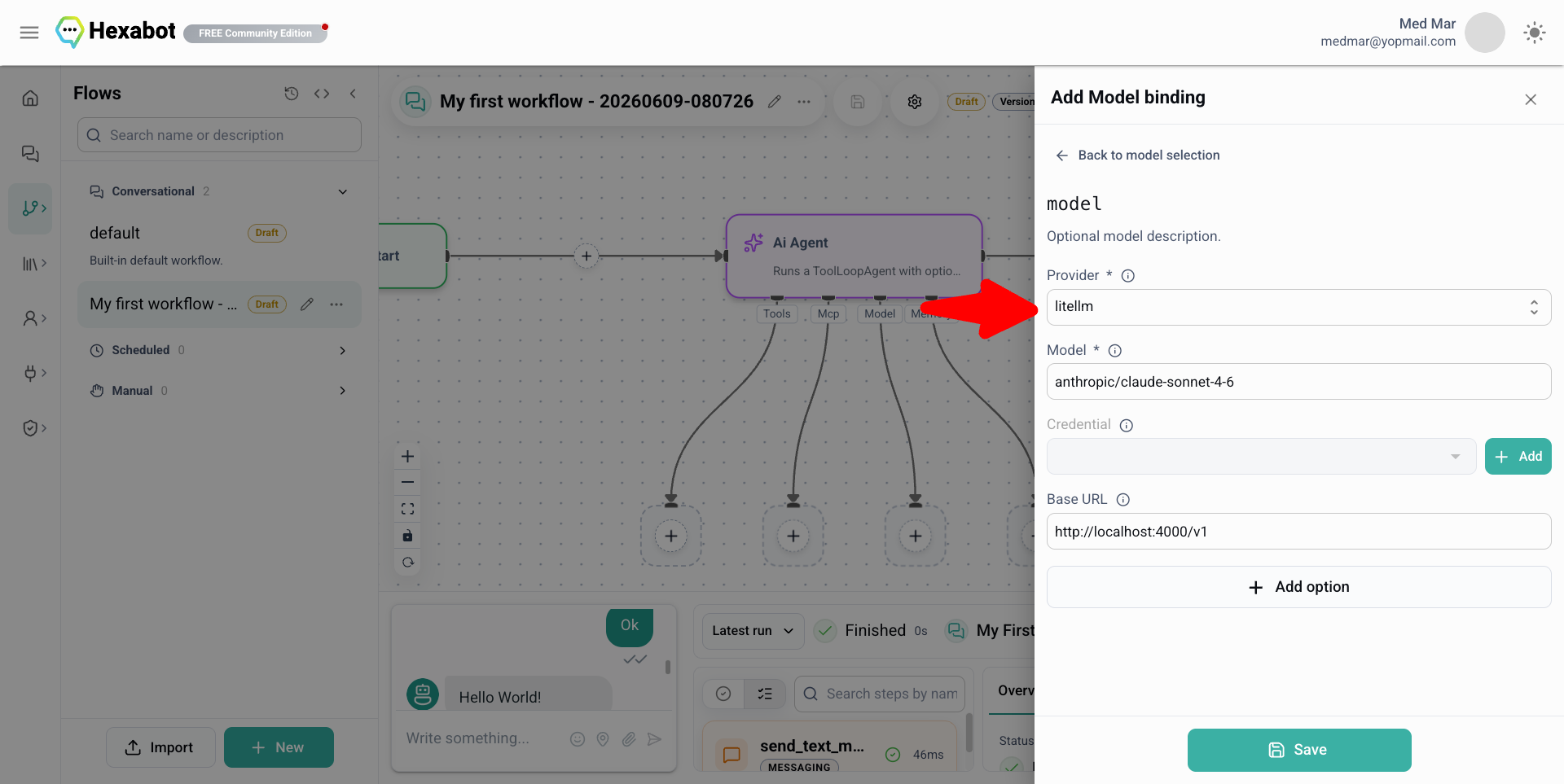
That means you can select litellm as the provider, configure your LiteLLM proxy URL, set the model you want to use, and provide the LiteLLM API key or virtual key.
Once configured, Hexabot can use LiteLLM inside supported AI actions such as:
ai_generate_reply
Use this when you want Hexabot to generate natural language output.
Example use cases:
-
Generate a support reply.
-
Rewrite a customer message.
-
Summarize a conversation.
-
Draft a marketing response.
-
Create a personalized notification.
ai_infer_object
Use this when you want the model to return structured data.
Example use cases:
-
Extract a lead profile from a user message.
-
Classify a support ticket.
-
Detect sentiment, urgency, or intent.
-
Convert free text into a JSON object.
-
Identify missing fields in a form-like conversation.
ai_agent
Use this when you need a more agentic workflow, where the model can reason across context and interact with tools or workflow steps.
Example use cases:
-
Support triage agents.
-
Sales qualification agents.
-
Internal operations assistants.
-
Multi-step reasoning workflows.
-
AI workflows connected to APIs, MCP servers, or business tools.
The important part is that Hexabot workflows do not need to be tightly coupled to one LLM provider. LiteLLM becomes the gateway layer, and Hexabot focuses on orchestration, actions, workflows, memory, and channels.
Why This Matters for AI Automation Teams
Adding another LLM provider may sound like a technical update, but this one has strategic value.
LiteLLM is not just “one more model provider.” It is a way to make your AI infrastructure more flexible, more portable, and easier to control.
1. Less Vendor Lock-In
AI models change quickly.
The best model for reasoning today may not be the best one tomorrow. The best model for customer support may not be the best one for JSON extraction. The cheapest model for high-volume tasks may not be the most reliable model for sensitive workflows.
Without a gateway layer, every provider change can become an engineering task.
With LiteLLM, you can centralize model routing and keep Hexabot workflows cleaner.
This gives you more freedom to experiment with different providers while keeping your automation logic stable.
2. Better Cost Control
AI automation can become expensive when every workflow step calls a powerful model by default.
A better architecture is to route tasks intelligently:
-
Use a cheaper model for simple classification.
-
Use a stronger model for complex reasoning.
-
Use local or self-hosted models when possible.
-
Add fallback models only when needed.
-
Track spend across projects or teams.
LiteLLM helps centralize that control, while Hexabot lets you design the workflow logic around it.
For example, a customer support workflow could use:
-
A lightweight model for intent detection.
-
A stronger model for complex technical replies.
-
A local model for internal summarization.
-
A fallback model when the primary provider fails.
That is the kind of architecture teams need when moving from demos to production.
3. More Deployment Flexibility
Not every team wants the same AI setup.
Some teams want OpenAI. Some want Azure OpenAI for enterprise reasons. Some want Anthropic. Some want Bedrock. Some want Ollama or private models. Some want to test multiple providers before committing.
LiteLLM makes this easier because Hexabot only needs to talk to the gateway. The gateway handles the provider complexity.
This is especially useful for agencies, SaaS builders, AI automation consultants, and enterprises that need to deploy different AI configurations for different customers.
4. Cleaner Self-Hosted AI Architecture
Hexabot is designed for teams that want control over their automation stack.
By combining Hexabot with LiteLLM, you can build a self-hosted AI automation architecture where:
-
Hexabot manages workflows, actions, channels, memory, and automation logic.
-
LiteLLM manages model access, routing, provider keys, and cost tracking.
-
Your own infrastructure controls deployment, data flow, and operational policies.
This is a strong pattern for production AI systems.
Instead of hardcoding model providers into every workflow, you create a clean separation:
Hexabot orchestrates the work. LiteLLM routes the intelligence.
How to Use LiteLLM in Hexabot
Here is a simple setup flow.
Step 1: Run a LiteLLM Proxy
First, create a LiteLLM configuration file.
Then start LiteLLM:
export OPENAI_API_KEY="your-openai-key"
export ANTHROPIC_API_KEY="your-anthropic-key"
export LITELLM_MASTER_KEY="sk-your-litellm-master-key"

litellm --config config.yaml --port 4000
Your LiteLLM proxy should now be available locally.
For example:
http://localhost:4000
Hexabot will use the OpenAI-compatible /v1 endpoint:
http://localhost:4000/v1
Step 2: Configure LiteLLM in Hexabot
In Hexabot, open the AI model binding configuration.
Select:
Provider: litellm
Then configure:
Base URL: http://localhost:4000/v1
Model: support-fast
API Key: sk-your-litellm-master-key
The model can be:
-
A LiteLLM model alias, such as
support-fast. -
A provider model configured inside your LiteLLM proxy.
-
Any model route exposed by your LiteLLM gateway.
For production, you should usually use LiteLLM virtual keys instead of exposing a master key broadly.
Example Architecture: Hexabot + LiteLLM
A production-ready setup could look like this:
User message
   ↓
Hexabot channel
   ↓
Hexabot workflow
   ↓
AI action: ai_infer_object
   ↓
LiteLLM gateway
   ↓
Selected LLM provider
   ↓
Structured result
   ↓
Hexabot action logic
   ↓
CRM / ticketing / notification / human handoff
This architecture keeps responsibilities clear.
Hexabot is responsible for:
-
Conversation flow
-
Workflow orchestration
-
AI actions
-
Integrations
-
Memory
-
Business logic
-
Human handoff
LiteLLM is responsible for:
-
LLM provider routing
-
Model aliases
-
API key centralization
-
Cost tracking
-
Fallbacks
-
Budgets and rate limits
-
Provider flexibility
Together, they provide a practical foundation for real-world AI automation.
Best Practices
Use Model Aliases
Instead of putting provider-specific model names everywhere, define aliases in LiteLLM.
For example:
model_name: support-fast
Then use support-fast in Hexabot.
Later, you can change what support-fast points to without changing the workflow.
Separate Simple and Complex Tasks
Do not use your most expensive model for every step.
For example:
-
Classification: fast, cheaper model.
-
Summarization: mid-range model.
-
Complex reasoning: stronger model.
-
Sensitive workflows: controlled or private model.
This is one of the easiest ways to reduce AI costs.
Use Fallbacks for Production
Production AI systems need resilience.
If one provider is down, slow, or rate-limited, LiteLLM can help route requests to another model. This is especially useful for customer-facing automations where reliability matters.
Keep Business Logic in Hexabot
Do not ask the LLM to control everything.
A better pattern is:
-
Let the LLM interpret, classify, summarize, or reason.
-
Let Hexabot execute deterministic workflow steps.
-
Use conditions, actions, and human validation where needed.
This makes your automation easier to test, debug, and trust.
Use Virtual Keys
For teams and production deployments, avoid using one shared master key everywhere.
LiteLLM virtual keys make it easier to separate environments, users, teams, and projects.
Why This Integration Is Interesting
AI automation is not just about calling an LLM.
The real challenge is building systems that are:
-
Reliable
-
Cost-aware
-
Flexible
-
Maintainable
-
Easy to deploy
-
Easy to modify
-
Safe enough for real business workflows
The Hexabot + LiteLLM integration helps move in that direction.
Hexabot gives developers a self-hosted AI automation platform with workflows, actions, agents, memory, and conversational channels.
LiteLLM gives teams a unified gateway to the wider LLM ecosystem.
Together, they make it easier to build AI workflows that are not locked into one provider and not hardcoded around one model.
Final Thoughts
The addition of LiteLLM support in Hexabot is a small configuration change with a big architectural impact.
You can now build Hexabot AI workflows that route through LiteLLM and access a much wider model ecosystem from a single gateway.
For developers, this means more freedom. For teams, it means better control. For production AI automation, it means a cleaner architecture.
If you are building AI agents, customer support automations, lead qualification flows, or internal workflow assistants, this integration gives you a more flexible way to manage your LLM layer.
A special thanks again to Aarish Alam from the LiteLLM team for contributing this integration.
Hexabot continues to evolve as a self-hosted, fair-core AI automation platform for developers and teams who want to build practical AI workflows with control, extensibility, and production readiness.
Now you can bring your own LiteLLM gateway, connect your preferred models, and let Hexabot orchestrate the automation layer around them.